Category: Problem

  • Ecosystem Strategy

    Ecosystem Strategy

    A few years ago, I was working on a platform product that had everything going for it. Strong core technology, enthusiastic early adopters, and a clear market need. We were growing steadily. Then one quarter, growth stalled. Not because we lost customers, but because we stopped winning new ones.

    When we dug into the win/loss data, the pattern was clear. Prospects were not choosing us because our product was weak. They were choosing competitors because those competitors had integrations with the tools the prospects already used. Our product was an island. The competitor’s product was a neighborhood.

    That was my introduction to ecosystem strategy. The product itself matters, but the network of partners, integrations, and developers around it often matters more.

    What Is an Ecosystem Strategy?

    An ecosystem strategy is the deliberate practice of mapping and building the network of partners, developers, integrations, and complementary products that make your platform more valuable. It is the recognition that in a connected world, your product’s value depends partly on what surrounds it.

    In the 5Ps framework, ecosystem strategy sits in the Problem phase. Understanding your ecosystem is part of understanding the problem space. Before you can solve a customer’s problem, you need to understand the full context of their workflow — and that workflow almost always extends beyond your product’s boundaries.

    Your customer segmentation tells you who your customers are. Your ecosystem strategy tells you what world those customers live in.

    Why Ecosystems Matter

    The core product gets you in the door. The ecosystem keeps you in the building.

    When a customer evaluates a platform, they are not just evaluating features. They are evaluating whether the platform fits into their existing stack. Can it connect to their CRM? Does it work with their analytics tools? Can their team build custom workflows on top of it?

    Geoffrey Moore explores this in Crossing the Chasm, where he describes how the “whole product” extends far beyond what you ship. The core product is necessary but not sufficient. Customers need the surrounding services, integrations, and community to get full value.

    This creates a reinforcing cycle. More integrations attract more customers. More customers attract more partners. More partners build more integrations. Once this cycle is spinning, it becomes very difficult for competitors to disrupt.

    The Three Layers of an Ecosystem

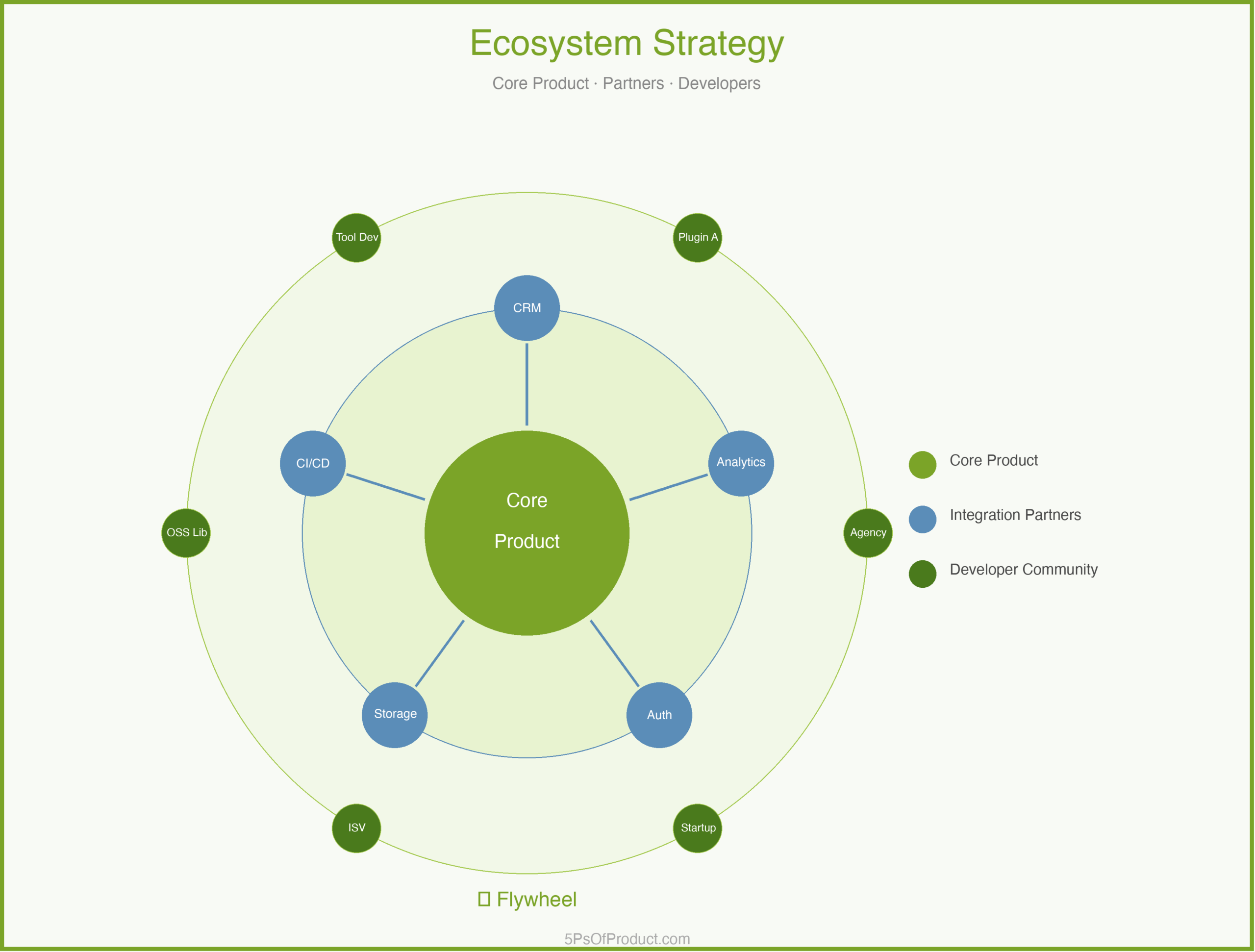
    1. Integration Partners

    These are the products your platform connects to. They answer the most basic customer question: “Will this work with what I already have?”

    The key decision is whether to build integrations yourself or provide tools for partners to build them. Building yourself is faster but doesn’t scale. Partner-built integrations scale but require investment in documentation, APIs, and support.

    2. Solution Partners

    These are the consultants, agencies, and system integrators who help customers implement and extend your platform. One good solution partner can bring you dozens of customers because they recommend your product as part of every engagement.

    Solution partners need training, certification, and leads. This is a real investment, not just a partner portal and a logo on your website.

    3. Developer Community

    These are the independent developers and startups who build on top of your platform. A developer community is the most powerful layer because it creates value you could never build yourself. But it is also the hardest to cultivate because developers are skeptical of platforms that might change APIs or terms without warning.

    A Concrete Example: CloudMesh

    Imagine a cloud infrastructure platform called “CloudMesh” that provides compute, storage, and networking services. CloudMesh has solid technology but limited market share.

    CloudMesh’s PM maps the ecosystem across all three layers:

    Integration Partners: Customers keep asking for integrations with popular monitoring tools, CI/CD platforms, and identity providers. CloudMesh has built two integrations in-house, but competitors offer fifteen or more. The PM realizes they need an integration marketplace, not more in-house connectors.

    Solution Partners: CloudMesh has no formal partner program. A handful of consulting firms have figured out CloudMesh on their own, but they receive no support. The PM launches a lightweight certification program. Within six months, certified partners are generating 30% of new customer referrals.

    Developer Community: CloudMesh has good APIs but poor documentation. The PM invests in a documentation overhaul, a sample applications library, and a dedicated developer advocate. Over the following year, third-party plugins grow from 12 to 85.

    The ecosystem didn’t replace the core product. It amplified it.

    The Ecosystem Flywheel

    The real power of an ecosystem is the flywheel effect. More integrations make the platform more attractive to customers. More customers make the platform more attractive to solution partners. More solution partners bring more customers. More customers attract more developers. More developers build more integrations.

    The hardest part is getting the flywheel started. In the early days, you need to do things that don’t scale. Build integrations yourself. Recruit partners one by one. Write the documentation personally. Invest in the community before the community invests in you.

    Building vs. Buying an Ecosystem

    Building is slower but gives you more control. You set the terms, shape the culture, maintain the quality bar. The risk is that it takes years to reach critical mass.

    Acquiring is faster but comes with integration debt. You get instant access to a partner network, but those partners have existing expectations. Merging two partner programs is like merging two cultures.

    In my experience, the best approach is to build the foundation yourself and grow organically. You cannot shortcut trust.

    How to Use With AI

    1. The Ecosystem Mapper

    Understanding your ecosystem starts with knowing what exists.

    Prompt: “Based on this list of customer tech stacks, identify the 5 most common tools that appear alongside our product. For each, describe the integration use case and estimate how many customers would benefit from a native integration.”

    2. The Partner Pitch Generator

    Recruiting partners requires tailored outreach.

    Prompt: “Write a one-paragraph partnership pitch to [Partner Type]. Focus on what they gain: access to our customer base, co-marketing opportunities, and revenue share.”

    3. The Documentation Gap Finder

    Developer ecosystems live or die on documentation quality.

    Prompt: “As a developer trying to build an integration for the first time, what is confusing about this documentation? What is missing? What would make you give up and choose a different platform?”

    Guardrail: AI can help identify ecosystem gaps and draft partner communications, but ecosystem relationships are fundamentally human. Use AI for the analysis, but build the relationships yourself.

    Conclusion

    An ecosystem strategy is not a nice-to-have for platform products. It is the difference between a product that grows linearly and one that grows exponentially. The core product is the engine. The ecosystem is the fuel.

    This connects to your competitive analysis. When you map the landscape, look beyond the product. A competitor with a weaker product but a stronger ecosystem will often win. And your go-to-market strategy should include your ecosystem as a central pillar, not an afterthought.

    What do you think? Comments are gladly welcome.
  • Competitive Analysis

    Competitive Analysis

    A few years into my product career, I joined a team that was building a project management tool for creative teams. We had a solid product, loyal users, and a clear roadmap. Then a competitor launched a free tier that undercut our pricing by half. Within three months we lost 20% of our trial conversions. The product hadn’t changed. The market had.

    That was the moment I learned that understanding your product in isolation is not enough. You need to understand the environment it lives in. Competitive analysis is how you do that.

    What Is Competitive Analysis?

    Competitive analysis is the practice of systematically studying the companies, products, and alternatives your customers consider instead of yours. It is not corporate espionage and it is not obsessing over feature parity. It is understanding the choices your customers face so you can position your product in a way that matters.

    In the 5Ps framework, competitive analysis sits in the Problem phase. Before you can define a solution, you need to understand the full problem space, and that includes knowing what solutions already exist. A problem that already has ten good answers is a very different challenge than one nobody has tried to solve.

    This feeds directly into your Strategy Pyramid. You cannot set a credible product strategy without knowing what you are up against. And it connects to your product vision, because a vision that ignores the competitive reality is just a wish.

    Why Most Competitive Analysis Falls Short

    Here is what I see go wrong most often: teams treat competitive analysis as a one-time exercise. Someone builds a spreadsheet comparing features. The spreadsheet gets presented in a meeting. Then it sits in a shared drive collecting dust until a sales rep asks for it six months later.

    The problem with this approach is that markets move. Competitors ship new features, change pricing, acquire companies, and pivot their positioning. A snapshot from six months ago is not analysis. It is archaeology.

    The other common mistake is focusing exclusively on features. Feature matrices are comforting because they are concrete and measurable. But customers rarely choose a product based on feature count. They choose based on how well a product solves their specific problem, how much it costs, how easy it is to adopt, and whether the company behind it feels trustworthy. None of that shows up in a feature checklist.

    The Four Dimensions of Competition

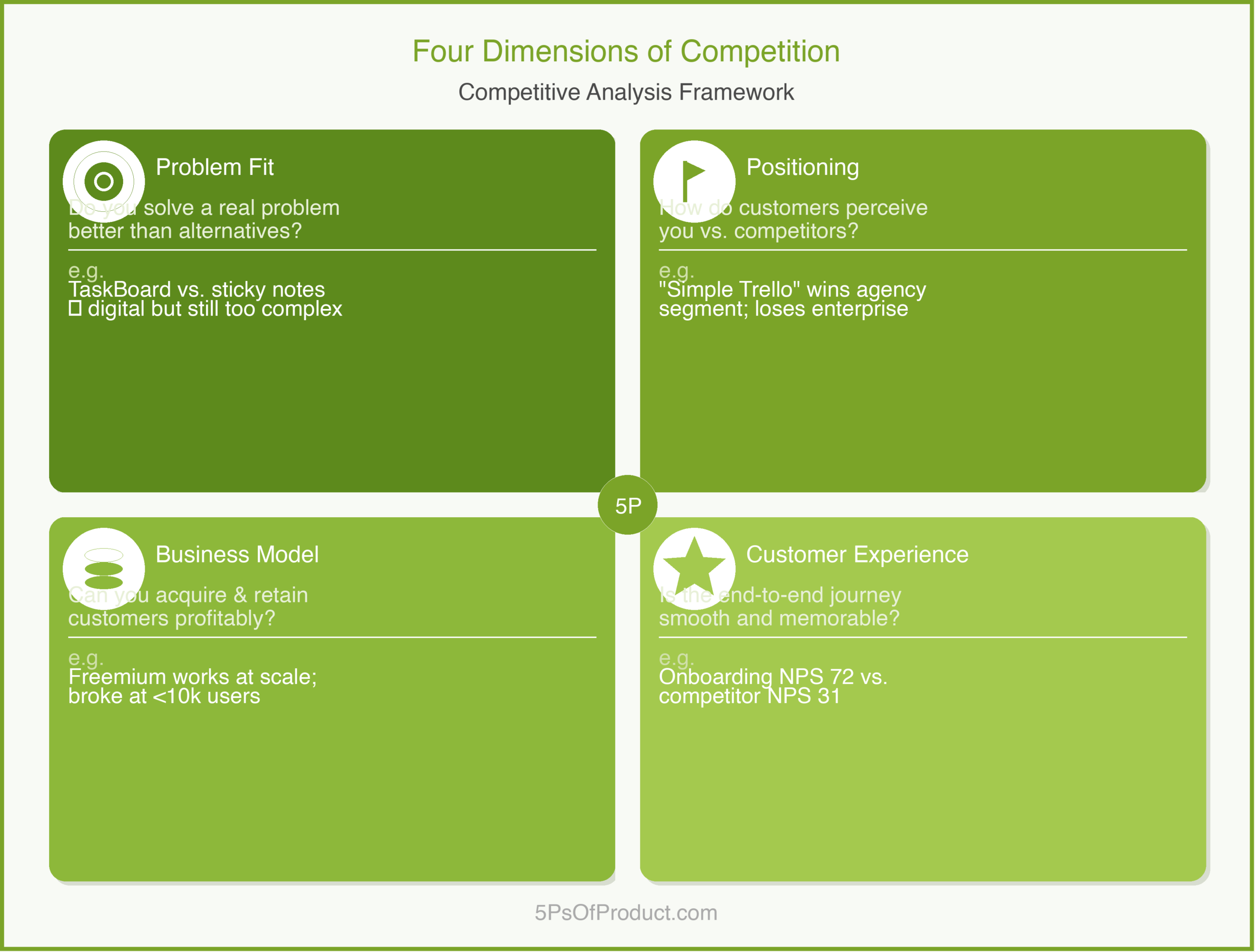
    In my experience, meaningful competitive analysis covers four dimensions. Features are one of them, but only one.

    1. Problem Fit

    What problem does each competitor solve, and for whom? Two products might look similar on the surface but target completely different segments. Basecamp and Jira are both “project management tools,” but they serve different audiences with different workflows. Understanding this distinction matters because it tells you where there is room to differentiate and where there is not.

    2. Positioning and Messaging

    How does each competitor describe itself? What do they emphasize in their marketing? What do they leave out? Positioning reveals strategic choices. If a competitor leads with “enterprise-grade security,” they are probably targeting regulated industries. If they lead with “get started in 30 seconds,” they are targeting individuals and small teams.

    3. Business Model

    How does each competitor make money? Pricing structure, free tiers, contract length, upsell paths. Business model differences create strategic openings. If every competitor charges per seat, a flat-rate model might be the differentiator that wins teams with large headcounts.

    4. Customer Experience

    What do real users say about each product? Review sites like G2 and Capterra are goldmines for this. Look for patterns in complaints and praise. If every competitor’s users complain about the same thing, that unmet need is your opportunity.

    A Concrete Example: TaskBoard

    Imagine a B2B SaaS company called “TaskBoard” that builds a lightweight project management tool for marketing teams. TaskBoard’s PM sits down to do a competitive analysis and maps five competitors across the four dimensions.

    Problem Fit: Two competitors target engineering teams specifically. One targets agencies. Two are horizontal tools. TaskBoard targets marketing teams — the engineering-focused tools are not true competitors despite having similar features.

    Positioning: The agency tool emphasizes client collaboration. The horizontal tools emphasize flexibility. Nobody is positioning around marketing-specific workflows like campaign planning and content calendars. That is a gap.

    Business Model: Three charge per seat. One charges a flat rate per workspace. Marketing teams tend to be large — a flat-rate model might be more attractive.

    Customer Experience: Reading 200 reviews on G2, a clear pattern emerges: users love flexibility but hate setup time. Marketing teams want opinionated templates, not blank canvases.

    The analysis shapes three strategic decisions: marketing-specific templates as a core differentiator, testing flat-rate pricing, and positioning around time-to-value. None of these would have been obvious from a feature comparison alone.

    Keeping It Alive

    The most useful competitive analyses are living documents, not one-time reports. Here is what has worked for me:

    Set a cadence. Review your competitive landscape quarterly. Markets change, and your analysis should change with it.

    Assign ownership. Someone on the team should own the competitive brief. Without ownership, it drifts.

    Use win/loss interviews. Talk to customers who chose a competitor. Ben Horowitz describes this well in The Hard Thing About Hard Things: the data you need most is the data that is hardest to hear.

    Feed it into your roadmap. Every quarterly review should end with: “Given what we know, should our priorities change?”

    The Differentiation Trap

    One nuance that took me years to appreciate: competitive analysis is not about copying what works for others. It is about finding where others have made trade-offs that leave room for you.

    Every product makes trade-offs. A competitor that optimizes for enterprise features will inevitably sacrifice simplicity. Michael Porter’s work on competitive strategy makes this point clearly: strategy is about choosing what not to do. Your competitive analysis should help you find the trade-offs your competitors have made and decide whether the opposite trade-off serves a segment they are underserving.

    The danger is benchmarking yourself into mediocrity. If you add every feature your competitors have, you end up with a bloated product that does everything adequately and nothing well. The goal is not parity. It is clarity about where you win.

    How to Use With AI

    AI is remarkably good at the mechanical parts of competitive analysis. It cannot make strategic decisions for you, but it can accelerate the research that informs those decisions.

    1. The Review Synthesizer

    Reading hundreds of competitor reviews on G2 is tedious but valuable. AI can compress weeks of reading into hours.

    The Workflow:
    1. Export reviews for 2-3 key competitors.
    2. Prompt: “I have pasted 100 G2 reviews for [Competitor]. Group the complaints into 3-5 themes based on the underlying problem. For each theme, estimate what percentage of reviews mention it and quote one representative review.”

    2. The Positioning Decoder

    Competitor websites are carefully crafted to emphasize strengths and hide weaknesses. AI can help you read between the lines.

    The Workflow:
    1. Paste the competitor’s homepage copy, pricing page, and one case study.
    2. Prompt: “Based on this messaging, who is this product’s ideal customer? What problem are they solving? What are they deliberately not mentioning?”

    3. The Gap Finder

    Once you have mapped your competitive landscape, AI can help identify white space.

    The Workflow:
    1. Summarize each competitor’s positioning and top 3 strengths.
    2. Prompt: “Given these five competitors, where are the gaps? Which customer segments are underserved?”

    The Guardrail: AI has no access to your actual market data. It does not know your win rates or your customers’ willingness to pay. Every insight from AI-assisted competitive analysis must be validated against your own data. Use it to generate hypotheses, not conclusions.

    Conclusion

    Competitive analysis is one of those practices that separates strategic product management from reactive feature building. When you understand the landscape, you can make deliberate trade-offs. When you don’t, you end up chasing competitors into a go-to-market strategy that tries to be everything to everyone.

    The goal is not to obsess over what others are doing. It is to understand the choices your customers face so you can give them a better one.

    What do you think? How does your team approach competitive analysis? Comments are gladly welcome.

  • How to Conduct Customer Interviews That Reveal Real Problems

    How to Conduct Customer Interviews That Reveal Real Problems

    Early in my career, I built a feature that 15 customers had asked for. We shipped it. Almost nobody used it. The customers were telling the truth — they did want the feature. But they did not need it. The real problem was something they had not thought to articulate, and I had not thought to ask about.

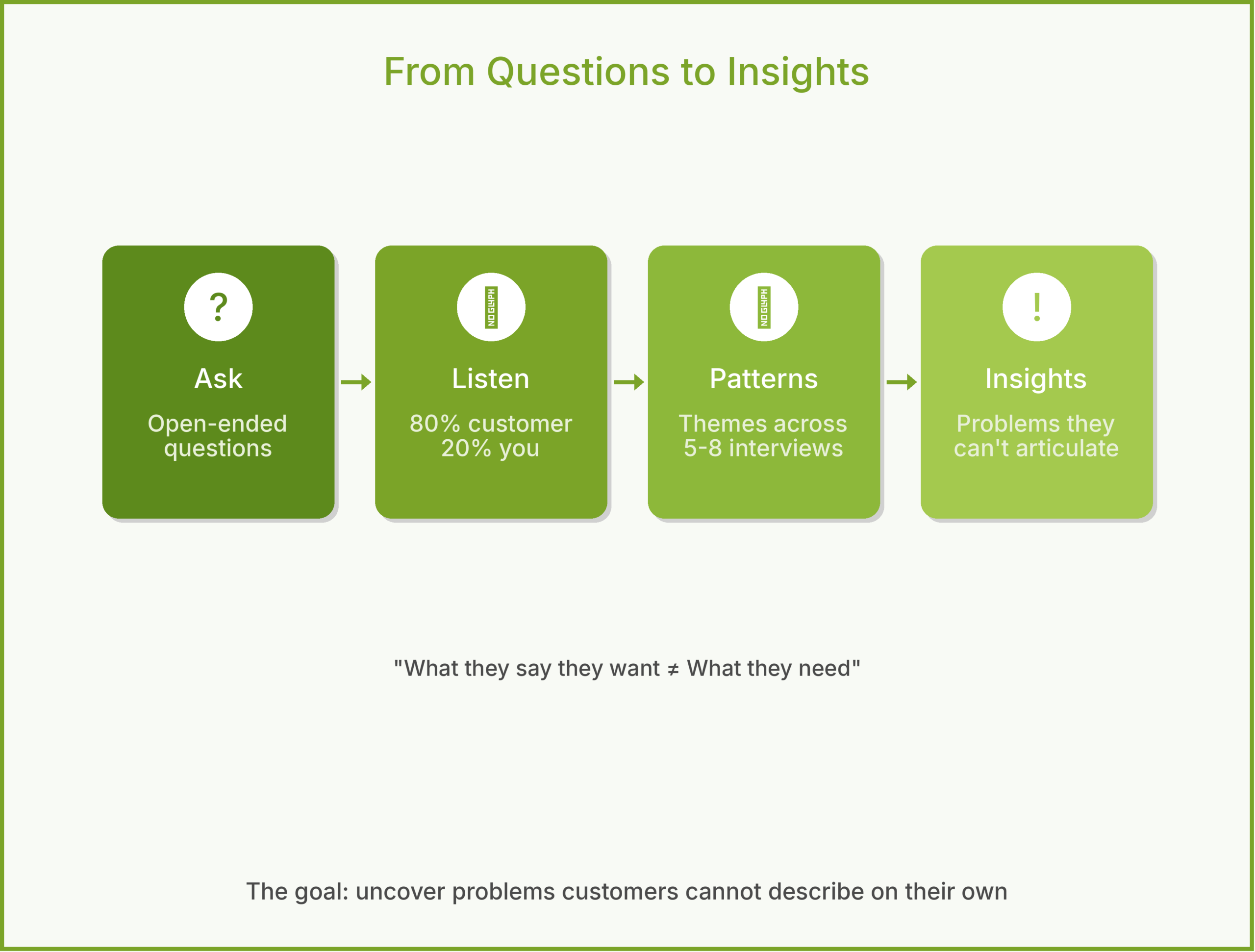
    That experience changed how I approach customer research. The goal of a customer interview is not to collect feature requests. It is to uncover problems that customers may not be able to describe on their own.

    The Trap: Asking What People Want

    When you ask “what features would you like?” you get a list of solutions. People are generally good at describing what annoys them and bad at designing solutions. If you had asked web users in 1995 what they wanted, they would have said “faster loading pages.” The job of the PM is to hear the frustration and trace it back to the root cause.

    I call this The Solution Trap — customers describe the fix they have already imagined instead of the pain they actually feel. Your job is to sidestep the trap and get to the real problem underneath.

    What Is a Customer Interview?

    A customer interview is a structured, one-on-one conversation designed to uncover real problems — not to validate your ideas or collect feature requests. It is different from a usability test (which evaluates a specific interface) or a survey (which quantifies known issues at scale). The interview is exploratory. You are trying to learn something you do not already know.

    The best framework I have found for this is Teresa Torres’ continuous discovery approach: interview at least one customer every week, not in big annual batches. Small, frequent conversations keep you grounded in reality as your product evolves.

    Planning the Interview

    Recruit the right people. Interview current users, churned users, and people who evaluated your product but chose a competitor. Each group tells you something different. Current users reveal usability issues. Churned users reveal unmet needs. Lost deals reveal competitive gaps.

    Write a discussion guide. Not a script — a guide. List 8-10 open-ended questions organized by topic. Start broad (“Tell me about the last time you had to…”) and narrow gradually (“Walk me through exactly what happened”). Leave room to follow unexpected threads.

    Target 5-8 interviews per round. Jakob Nielsen’s usability research found that 5 participants uncover roughly 80% of usability issues. After 8, you start hearing the same themes. More interviews per round is rarely better than more rounds of interviews over time.

    A Sample Discussion Guide

    For a fictional company called InsightBoard that builds a PM analytics dashboard:

    1. “Tell me about your typical Monday morning. How do you figure out what to focus on this week?”
    2. “Walk me through the last time you needed to make a data-driven product decision. What did you do?”
    3. “Where did you go for the data? How long did it take?”
    4. “What was frustrating about that process?”
    5. “If that frustration disappeared tomorrow, what would be different about your work?”
    6. “Tell me about a time you made a product decision you later regretted. What information would have changed that?”
    7. “How do you share product data with your team or stakeholders today?”

    Notice: no question mentions InsightBoard or asks about features. Every question is about the customer’s life, their workflow, and their frustrations.

    During the Interview

    Listen more than you talk. A good ratio is 80% customer, 20% you. Your job is to ask the question and then get out of the way. The instinct to explain your product or defend your choices is strong. Resist it.

    Follow the energy. When a customer’s voice changes — they get animated, frustrated, or suddenly quiet — that is a signal. Dig deeper. “You mentioned that was frustrating. Tell me more about that.”

    Ask for specifics. “Usually” and “sometimes” hide the truth. Push for: “Can you tell me about the most recent time that happened? Walk me through it step by step.” Specific stories reveal more than generalizations.

    Avoid leading questions. “Don’t you think it would be helpful if…?” is not a question. It is a pitch. Same with “Would you use a feature that…?” The answer is always yes, and it means nothing.

    An Example: InsightBoard

    InsightBoard’s team interviews 6 product managers at mid-size SaaS (software-as-a-service) companies. They expect to hear about dashboard features — better charts, more integrations, real-time data.

    Instead, three themes emerge. First, PMs are spending 3-4 hours per week assembling data from different tools before they can analyze anything. Second, when they share data with executives, they spend more time explaining the methodology than discussing the insights. Third, PMs do not trust their own data — they worry about conflicting numbers across tools.

    The original product idea was “a better analytics dashboard.” After interviews, the product vision shifts to “eliminate the 4 hours PMs spend assembling data before they can think.” That is a very different product, and a much more valuable one.

    Common Mistakes

    Confirmation bias. You already believe your product solves a problem, so you unconsciously steer conversations toward confirming that belief. The fix: have someone outside the product team review your discussion guide for leading questions.

    Interviewing only fans. Happy customers are easy to recruit and pleasant to talk to. But they will not tell you what needs fixing. Make churned users and lost deals at least 30% of your interview pool.

    Taking notes, not synthesizing. Raw interview notes are useless without synthesis. After each round, look for patterns across interviews. What themes appeared in 3 or more conversations? Where did customers disagree? The synthesis is where insights live.

    How to Use With AI

    AI tools can accelerate interview synthesis without replacing the interviews themselves.

    Build your discussion guide. Describe your product and target customer to Claude or ChatGPT. Ask it to generate 10 open-ended, non-leading interview questions. Then edit them — the AI will get you 70% of the way, and your product knowledge fills the rest.

    Synthesize themes. After a round of interviews, paste your anonymized notes into an AI and ask: “What are the top 5 themes across these interviews? Where do participants agree? Where do they disagree? What surprised you?” The AI is good at pattern-matching across large volumes of qualitative data.

    The guardrail: never let AI replace the interview itself. The whole point is hearing real humans describe real problems in their own words. AI can help you prepare and synthesize. It cannot sit across from a customer and notice when their voice changes.

    Why This Matters

    Customer interviews are the foundation of the Problem phase in the 5Ps framework. Get them right and every subsequent decision — what to build, how to price it, how to market it — becomes clearer. Get them wrong and you spend months building something elegant that nobody needs.

    The best interview I ever conducted lasted 22 minutes. The customer said one sentence that reframed our entire product strategy. You cannot get that from a survey. And you cannot get it from an AI. Some insights only come from sitting across from a real person and listening.

    What do you think? I would love to hear your interview techniques. Comments are gladly welcome.

  • Customer Segmentation

    Customer Segmentation

    Over my career, I have watched product teams build features that no one asked for. The culprit is almost always the same: they think of “customers” as one big blob. But customers are not a monolith. A first-time user has completely different needs than a power user. A startup founder cares about different things than an enterprise procurement manager. Treating them the same is a recipe for building something mediocre for everyone.

    Customer segmentation is the practice of dividing your customer base into distinct groups based on shared characteristics. It sounds simple, but getting it right is surprisingly hard. And getting it wrong has consequences that ripple through your entire product.

    Why Segmentation Matters for Product Managers

    In the 5Ps framework, customer segmentation sits squarely in the Problem phase, under Customer Needs. It feeds directly into your Strategy Pyramid—you cannot set goals or define strategy without knowing who you are building for. And “who” is rarely just one type of person.

    Here is what I have learned: the best product decisions come from knowing exactly which segment you are optimizing for—and which ones you are explicitly not optimizing for. That second part is just as important. If you try to please everyone, you end up pleasing no one.

    Segmentation gives you permission to say no. When a loud customer requests a feature, you can ask: “Which segment does this serve? Is that segment our priority right now?” If the answer is no, you have a principled reason to defer it.

    Common Segmentation Models

    There are many ways to slice your customer base. In my experience, the best approach depends on your product and market. Here are a few models I have found useful:

    Demographic Segmentation

    This is the most basic approach. You group customers by characteristics like company size, industry, geography, or job title. It is easy to measure and often a reasonable starting point.

    The problem is that demographics don’t always predict behavior. Two companies with 500 employees might have completely different needs if one is a fast-moving startup and the other is a traditional manufacturing firm.

    Behavioral Segmentation

    This groups customers by what they actually do with your product. How often do they log in? Which features do they use? How much do they spend? Behavioral segmentation is powerful because actions speak louder than demographics.

    The challenge is that you need good data. If you don’t have robust analytics, behavioral segmentation is mostly guesswork.

    Needs-Based Segmentation

    This is my favorite. You group customers by the problem they are trying to solve—the “job to be done,” as Clayton Christensen famously put it. Two customers might look completely different on paper but have the exact same underlying need.

    The downside is that needs-based segments are harder to identify and target. You can’t buy a mailing list of “people who need faster reporting.”

    Value-Based Segmentation

    Here you group customers by how much they are worth to you. High-value customers get white-glove treatment. Low-value customers get self-serve. This is useful for resource allocation, but it can feel cynical if you are not careful.

    A Concrete Example: TaskMaster

    To make the discussion more concrete, let’s pick a specific example. Imagine a B2B SaaS company called “TaskMaster” that sells a project management tool.

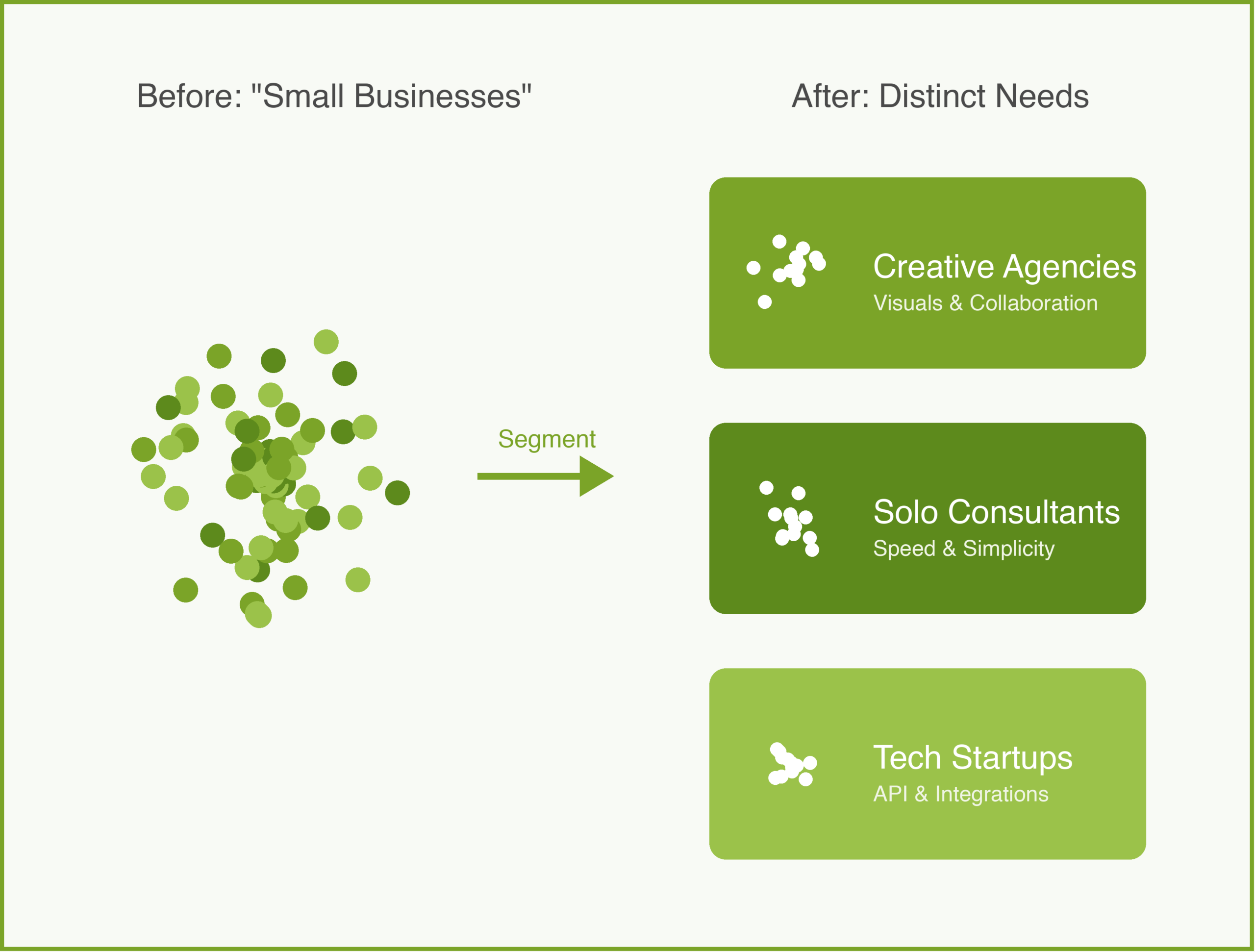
    They started by targeting “small businesses,” which seemed clear enough. But after a year, they noticed something odd. Some customers loved the product and renewed enthusiastically. Others churned after a month and left angry reviews. The product hadn’t changed. What was going on?

    When they dug deeper, they found that “small businesses” actually contained three distinct segments:

    1. Creative Agencies — Small teams (5-15 people) managing multiple client projects. They cared most about client collaboration and beautiful, shareable project views. They were willing to pay a premium for polish.

    2. Solo Consultants — One-person shops juggling many clients. They wanted simplicity and speed. Every extra click was painful. They were price-sensitive.

    3. Tech Startups — Fast-growing teams (10-50 people) with engineering-heavy workflows. They wanted integrations with GitHub and Slack. They cared about API access and automation.

    These three groups had completely different needs. The features that delighted Creative Agencies (fancy client portals) annoyed Solo Consultants (too much setup). The integrations that Tech Startups demanded were irrelevant to everyone else.

    TaskMaster had to make a choice. They couldn’t optimize for all three. They decided to focus on Creative Agencies because that segment had the highest willingness to pay and the best product-market fit. The product got better because they stopped trying to serve everyone.

    How to Choose Your Segments

    There is no formula for picking the right segments. But here are a few questions I ask:

    Can you actually reach them? A segment that sounds great on paper is useless if you have no way to find or market to those people.

    Are they big enough to matter? A hyper-specific segment might have perfect product-market fit, but if there are only 50 potential customers in the world, you have a problem.

    Will they pay enough? Some segments are large but price-sensitive. Others are small but have deep pockets. Both can work, but you need to know which game you are playing.

    Can you serve them better than alternatives? If a segment already has great options, winning them over is an uphill battle. Look for underserved segments where you can be the obvious choice.

    The Segmentation Trap

    One warning: segmentation can become an excuse for analysis paralysis. I have seen teams spend months debating personas and segments without ever talking to real customers.

    Segmentation is a tool, not an end in itself. The goal is to make better product decisions, not to create the perfect taxonomy. Start with a rough hypothesis, validate it with actual customer conversations, and refine as you learn.

    How to Use With AI

    This is where Generative AI shines. It is terrible at making the strategic choice for you (it doesn’t know your business strategy), but it is incredible at pattern matching large datasets and simulating empathy.

    Here are three concrete ways to use GenAI to sharpen your segmentation:

    1. The “Unstructured Data” Miner

    Product managers often sit on mountains of qualitative data—sales call recordings, support tickets, and open-ended survey responses—that are too time-consuming to analyze manually.

    The Workflow:
    1. Export your raw text data (e.g., last 100 negative reviews or sales call transcripts).
    2. Use a prompt like this:
    > “I have pasted 50 customer complaints below. Cluster them into 3-4 distinct groups based on the underlying problem they are trying to solve, not just the feature they are complaining about. For each group, give it a persona name and describe their ‘Job to be Done’.”

    Why this works: LLMs excel at semantic clustering. They can see that “I can’t export to PDF” and “My client can’t see the dashboard” are actually the same segment: “Agency Owners needing client reporting.”

    2. The “Synthetic User” Interview

    Once you have a hypothesis for a segment, you can create a “synthetic user” to test your assumptions before you ever talk to a human. This helps you refine your interview questions.

    The Workflow:
    1. Define the persona in the prompt.
    > “You are a ‘Solo Consultant’ who manages 5-10 clients. You are price-sensitive, hate complexity, and value speed above all else. I am going to pitch you a new feature. React honestly as this persona.”
    2. Pitch your idea.
    3. Ask the AI: “What is the first question you would ask me? What is your biggest hesitation?”

    Why this works: It allows you to “stress test” your value proposition. If the AI (acting as the persona) shrugs at your feature, a real human in that segment likely will too.

    3. The “Messaging Mirror”

    Different segments need to hear different things to buy the exact same product. Use AI to rewrite your pitch for each segment.

    The Workflow:
    1. Paste your generic value proposition.
    2. Prompt:
    > “Rewrite this value proposition for the ‘Tech Startup’ segment. Focus on API extensibility and automation. Use technical language.”
    > “Now rewrite it for the ‘Creative Agency’ segment. Focus on visual design and client impressions. Use aspirational language.”

    The Guardrail:
    AI is a mirror, not a crystal ball. It reflects the patterns in its training data (or the data you give it). It cannot tell you if a segment is financially viable or if they actually exist in your market. You must validate every AI-generated segment with real customer interviews and behavioral data. If the data doesn’t back it up, the segment is a hallucination.

    Conclusion

    Customer segmentation is one of those foundational practices that separates reactive product management from proactive product management. When you know exactly who you are building for, every decision gets easier—from your product vision to your user stories to your go-to-market strategy. When you don’t, you are just guessing.

    This is what has worked for me. Your segments will look different than mine. The important thing is to be intentional about it.

    What do you think? How does your team approach segmentation? Comments are gladly welcome.