
I once watched a team spend nine months building a payment processing API that was, by every technical measure, excellent. Fast, reliable, well-architected. They launched it with a blog post, a three-page quickstart guide, and a Swagger page. Six months later, adoption was flat. Developers would sign up, try the sandbox for an afternoon, and disappear.
The API wasn’t the problem. The experience of using the API was the problem. The quickstart assumed you already understood webhooks. The error messages returned cryptic codes with no explanation. The SDK had no code examples in the language most of their target developers actually used.
This is a pattern I have seen repeated across many companies: brilliant technology wrapped in a terrible experience. And it happens because most teams treat developer tools, documentation, and onboarding as afterthoughts. The insight that changed my thinking is simple: developer experience is the product.
What Is Developer Experience?
Developer experience — sometimes shortened to “DevEx” or “DX” — is the sum of every interaction a developer has with your tools, documentation, APIs, SDKs, and support channels. It is the developer equivalent of user experience.
Just as a consumer product PM thinks about the end-to-end user journey, a DevEx-focused PM thinks about the developer journey. How does a developer discover your API? How quickly can they get a “Hello World” response? What happens when something breaks at 2 AM?
The concept isn’t new. But what’s changed is treating it with the same rigor as any other product: with its own roadmap, its own user stories, its own metrics, and its own dedicated team.
The Components of Great Developer Experience
1. Time to First Value
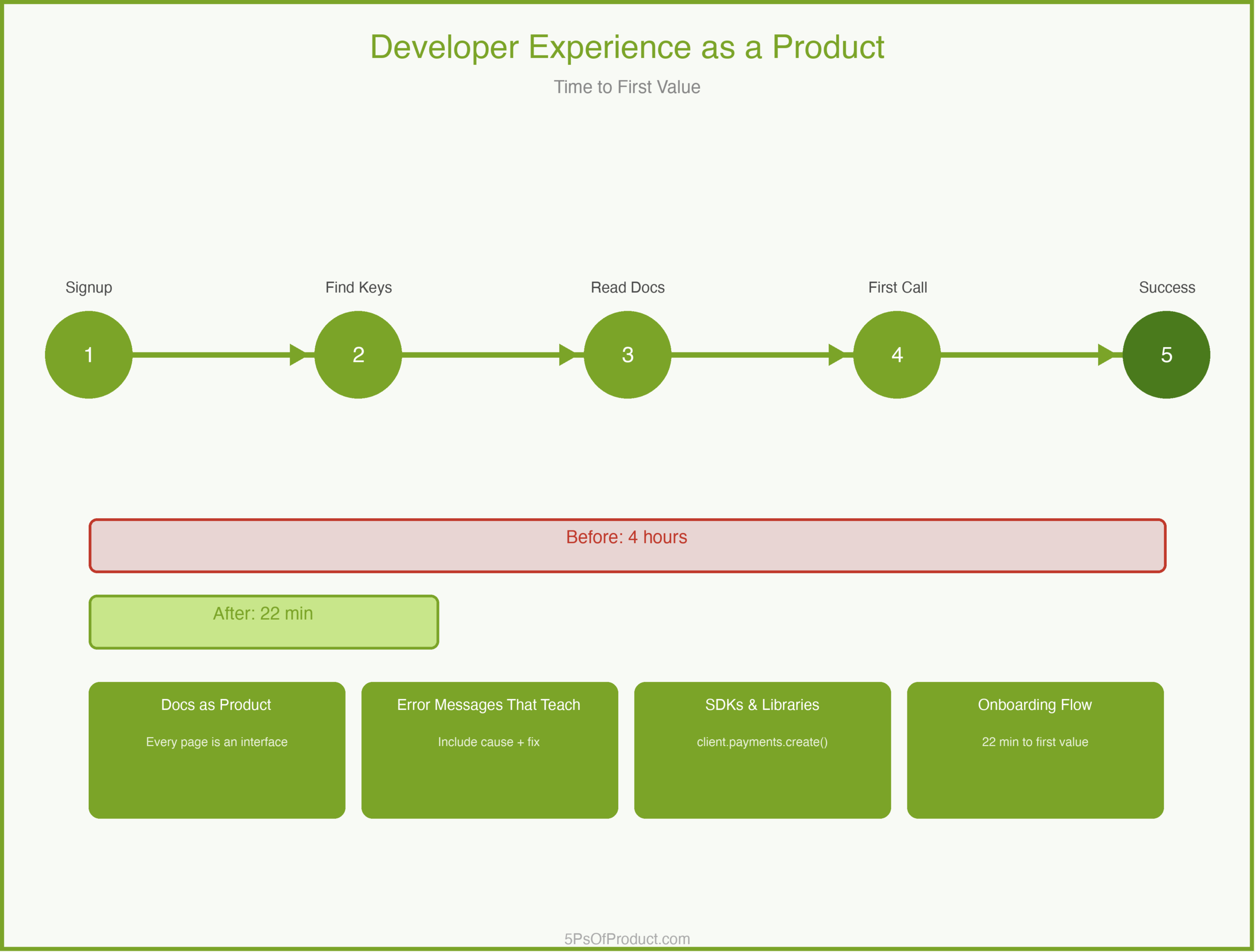
The single most important metric in DevEx is “time to first value” — how long it takes a developer to go from “I just signed up” to “I got something working.” The best developer products obsess over this number.
This is where most platforms lose developers. The signup is fine. But then the developer lands on a documentation page with twelve prerequisite steps and three required configuration files. They close the tab.
2. Documentation as Product
Documentation is not a chore you hand off to a technical writer after launch. It is a core product surface. Every page is an interface. Every code sample is a feature.
Good documentation answers three questions in order: What is this? How do I start? What do I do when it breaks?
3. Error Messages That Teach
When a developer hits an error, that is a product moment. A message that says “400 Bad Request” teaches nothing. A message that says “The ‘currency’ field is required and must be a three-letter ISO 4217 code (e.g., ‘USD’)” teaches the developer how to fix the problem without leaving their editor.
4. SDKs and Libraries
An API is a contract. An SDK is an experience. Developers don’t want to write raw HTTP calls. They want to call client.payments.create() in their language and have it work.
A Concrete Example: CodeBridge
Imagine a company called “CodeBridge” that provides payment processing APIs. They have a solid API — reliable, well-tested, good uptime. But developer adoption has stalled.
CodeBridge’s PM conducted a “developer journey audit.” She signed up as a new user and tried to process her first test payment. Finding the API keys took eight minutes (buried in a settings submenu). The quickstart assumed familiarity with OAuth 2.0. The first code sample used a language her target market rarely used. The sandbox returned an error with no context.
Total time to first successful payment: four hours.
The fix wasn’t to rebuild the API. It was to treat each friction point as a product bug. They built an interactive onboarding wizard that generated API keys inline. They rewrote the quickstart for the three most popular languages. They added contextual error messages. They put analytics on every documentation page to see where developers dropped off.
Within three months, time to first value dropped from four hours to twenty-two minutes. Adoption doubled.
The Documentation Roadmap
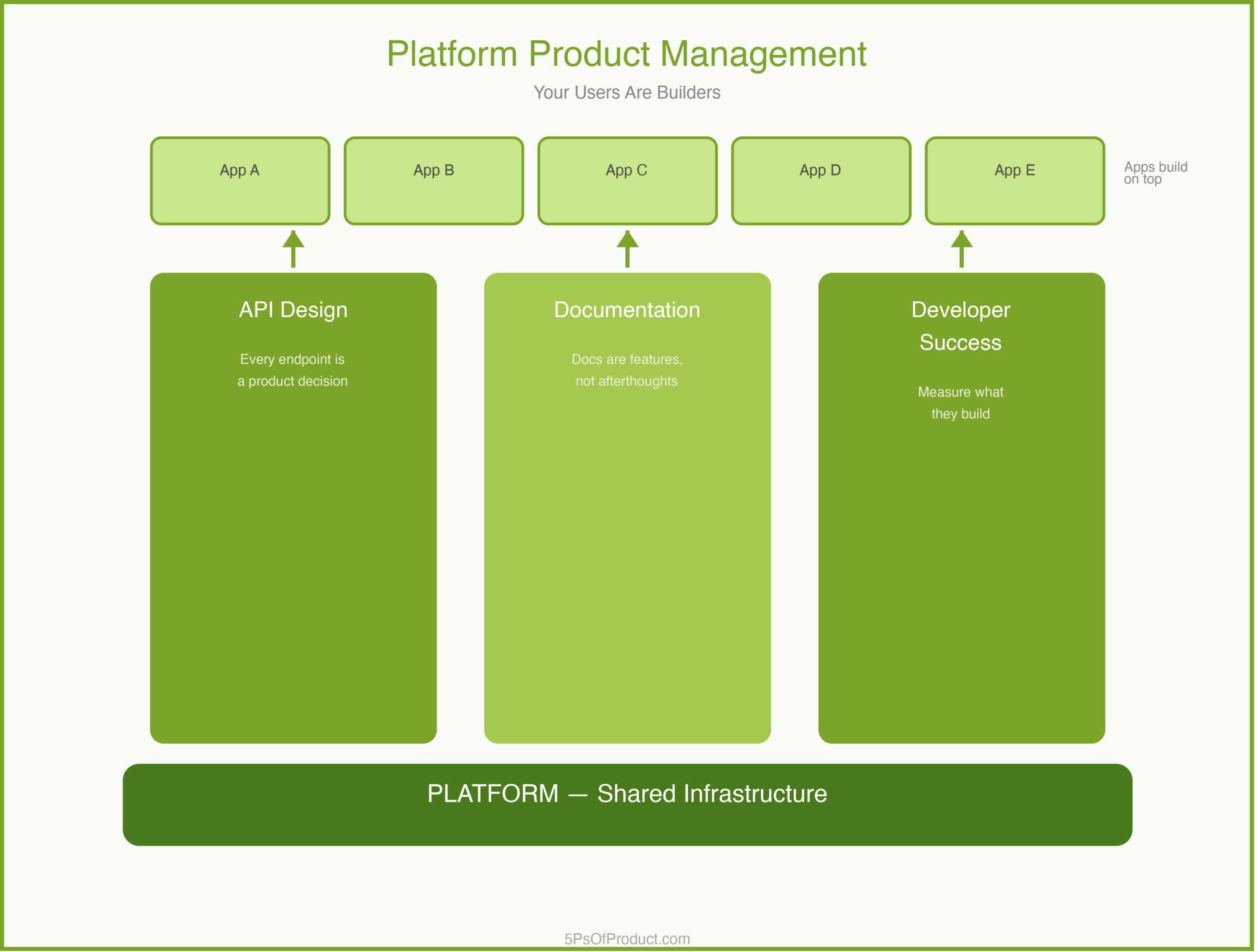
Here is an idea that surprises some PMs: your documentation should have its own roadmap, prioritized by developer impact, just like your product roadmap.
A documentation roadmap might include: rewriting quickstart guides for top languages, building an error code reference with searchable troubleshooting guides, creating end-to-end tutorials for common use cases, and adding versioned docs for older API versions.
Each item maps to a developer pain point, measured by support ticket volume, documentation page bounce rates, or sandbox completion rates. This is the MVP approach applied to documentation: ship the highest-impact improvements first, measure, iterate.
Why This Matters
Treating developer experience as a product matters because developers are your distribution channel. When a developer has a good experience with your platform, they bring it to their next company. When they have a bad experience, they warn their peers.
Developer trust is hard to earn and easy to lose. A single breaking change without a migration guide, a single undocumented behavior that causes a production outage — these become stories that spread through developer communities.
The companies that win in developer tools aren’t always the ones with the best technology. They are the ones with the best experience.
How to Use With AI
AI is useful for the mechanical parts of developer experience — the work that’s critical but tedious.
1. Documentation Gap Analysis
Paste your existing API reference and quickstart guide and ask it to find gaps from a beginner’s perspective.
Prompt: “Read this quickstart guide. Act as a junior developer who has never used a payment API before. List every assumption this guide makes that isn’t explained. For each gap, suggest a one-sentence clarification.”
2. Error Message Improvement
Feed your current error codes and messages and ask for developer-friendly rewrites.
Prompt: “Here are our current API error messages. For each, rewrite it to include: (1) what went wrong, (2) the most likely cause, and (3) how to fix it. Keep each message under 50 words.”
3. Code Sample Generation
When you need examples in multiple languages, draft one canonical example and ask AI to translate it.
Prompt: “Here is our payment creation example in Python. Translate it to JavaScript (Node.js), Ruby, and Go. Preserve the comments explaining each step. Use idiomatic patterns for each language.”
Guardrail: AI can generate documentation and code samples quickly, but a human developer must test every example end-to-end before publishing. An AI-generated code sample that doesn’t compile is worse than no sample at all.
Conclusion
Developer experience is not a nice-to-have layered on top of your real product. It is your product, experienced through documentation, error messages, SDKs, and onboarding flows. Treating it with the same rigor as your core API is what separates platforms that developers love from platforms that developers tolerate.
What do you think? Comments are gladly welcome.
Leave a Reply
You must be logged in to post a comment.