
About eight years ago, I joined a team building developer tools. On my first day, I did what I always did: I pulled up usage analytics, read support tickets, and started drafting a roadmap based on what end users were asking for. Within a week, the CTO pulled me aside. “You’re thinking about this wrong,” he said. “Our users don’t want features. They want capabilities. They want to build things we haven’t imagined yet.”
That conversation changed how I think about product management. When your product is a platform — APIs, SDKs, developer tools — the rules shift. You are no longer building for the person who clicks buttons. You are building for the person who writes code on top of your product. And that difference touches everything: how you define success, how you build your roadmap, and how you talk to your customers.
In the 5Ps framework, platform PM lives at the intersection of Platform and Product. Getting the strategy right still matters, but the strategy itself looks different when your customer’s customer is the real end user.
What Is Platform Product Management?
Platform product management is the practice of building and managing products that other developers build on top of. Your product isn’t the final experience. It is the foundation that enables others to create final experiences.
This is fundamentally different from consumer or SaaS product management. In a typical SaaS product, you control the entire user journey. In a platform, you control the building blocks, but someone else assembles the house. Your job is to make those building blocks reliable, composable, and well-documented.
The distinction matters because it changes your relationship with your user. A SaaS PM asks, “How do I get the user to complete this task?” A platform PM asks, “How do I give the developer everything they need to solve problems I haven’t anticipated?”
The Core Components
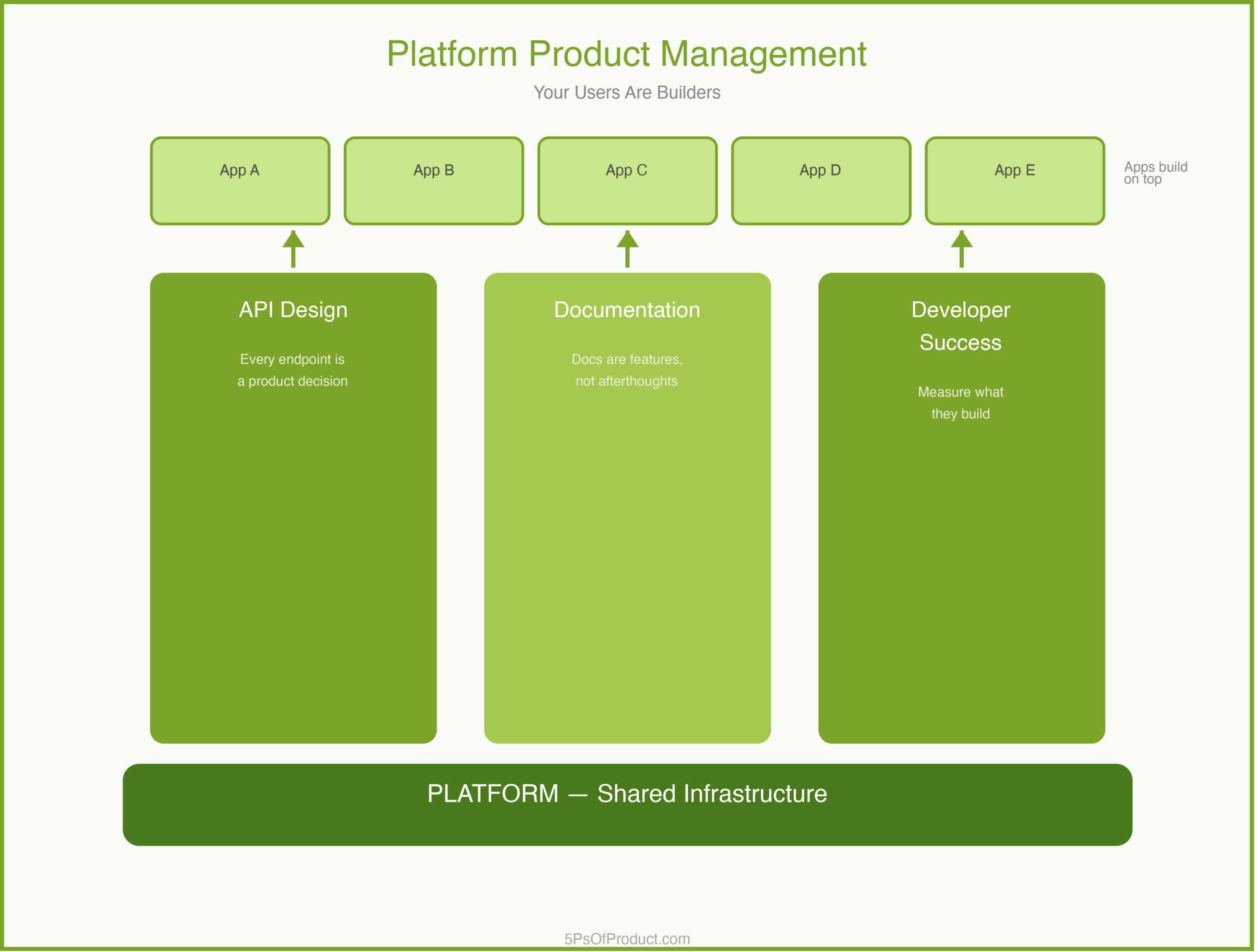
Platform PM has three pillars that differ from traditional product work.
1. API Design Is Your Product
In a consumer app, the UI is the product. On a platform, the API is. Every endpoint, every parameter name, every error message is a product decision. A confusing API is like a confusing checkout flow — developers will abandon it.
This means your product spec isn’t a wireframe. It is an API contract. And you need to think about backward compatibility the way a consumer PM thinks about onboarding flows — break it, and you lose trust.
2. Documentation Is a Feature
On a typical product, docs are a support function. On a platform, documentation is one of your most important features. If a developer can’t figure out how to integrate your SDK in an afternoon, you have a product problem, not a docs problem.
3. Your Success Metric Is Their Success
In SaaS, you measure adoption: DAUs, retention, NPS. On a platform, you measure what your developers build. Are they shipping integrations? Are those integrations retaining their own users? Your North Star isn’t “how many developers signed up.” It is “how many developers built something that works.”
A Concrete Example: DevGrid
To make this concrete, imagine a developer tools company called “DevGrid.” They provide infrastructure APIs that let other companies build real-time collaboration features — shared cursors, live editing, presence indicators.
DevGrid’s early roadmap looked like a typical SaaS roadmap. They prioritized features that their biggest customer asked for: a specific data export format, a custom authentication flow, a dashboard for monitoring usage.
The problem was that each of these was a one-off. Every feature served one customer’s needs but didn’t make the platform more capable for everyone.
The turning point came when DevGrid’s PM team shifted to a platform mindset. Instead of building the custom export format, they built a flexible webhook system that let any developer pipe data wherever they wanted. Instead of the custom auth flow, they built a pluggable authentication layer with clear extension points.
The result: DevGrid went from supporting 12 integration patterns to over 200. And the PM team stopped being a bottleneck for custom requests because developers could solve their own problems.
The Platform Roadmap Trap
Here is a nuance that catches many PMs moving into platform work. In consumer products, you can sequence features by user impact. “Feature A helps 80% of users, so we build it before Feature B, which helps 20%.”
On a platform, the calculus is different. You often need to build horizontal capabilities — things like rate limiting, versioning, or error handling — that no individual developer asked for but that every developer needs. These don’t show up in customer interviews. Nobody emails you saying, “Please build better API versioning.” But if you skip them, you will hit a wall when you try to update your API without breaking existing integrations.
The best platform PMs I have worked with keep a dual roadmap: one track for developer-requested capabilities, and one track for platform infrastructure that enables future growth. The infrastructure track often feels thankless, but it is what separates platforms that scale from platforms that collapse under their own weight. This is similar to how a strong go-to-market strategy balances short-term wins with long-term positioning.
Why This Matters
Platform product management matters because the stakes are higher than in typical product work. When you break a consumer feature, your users are frustrated. When you break a platform API, you break every application built on top of it. Your mistakes cascade.
But the upside is equally amplified. A well-designed platform creates leverage that a single product never can. You build one capability, and a thousand developers use it in ways you never imagined.
Getting the team structure right is critical here. Platform teams need deep technical expertise and long time horizons. They can’t be organized like feature teams churning out quarterly deliverables.
How to Use With AI
AI can be a powerful tool for the analytical side of platform PM — the parts that involve synthesizing large amounts of developer feedback and spotting patterns across hundreds of API consumers.
1. Developer Feedback Synthesis
Platform teams get feedback from many channels: GitHub issues, support tickets, developer forum posts, Slack messages. Feed a batch of these into an LLM and ask it to cluster them by underlying need, not surface request.
Prompt: “Here are 50 developer support tickets from the last month. Group them by the underlying capability gap, not the specific feature request. For each group, suggest whether the fix is a documentation improvement, an API change, or a new primitive.”
2. API Design Review
Before shipping a new endpoint, paste the spec and ask for a critique from the developer’s perspective.
Prompt: “Review this API endpoint design. Act as a developer who has never seen our platform before. What is confusing? What naming conventions are inconsistent with REST best practices? What error cases are missing?”
3. Breaking Change Impact Analysis
When you need to deprecate or modify an existing API, use AI to scan your documentation and sample integrations for potential downstream impact.
Prompt: “I need to change the response format of this endpoint. Here is the current spec and the proposed new spec. What migration steps would a developer need to take? Draft a migration guide.”
Guardrail: AI is useful for finding patterns in developer feedback and stress-testing API designs. But the decision about what to build — and what to deliberately not build — requires human judgment about your platform’s strategic direction.
Conclusion
Platform product management is a different discipline from consumer or SaaS PM. It requires a shift in mindset: from controlling the user experience to enabling the developer experience. From measuring clicks to measuring what gets built. From building features to building capabilities.
What do you think? Comments are gladly welcome.
Leave a Reply
You must be logged in to post a comment.