Category: Promotion

  • Product Benchmarking Strategy

    Product Benchmarking Strategy

    Early in my career, I watched a team spend six weeks building what they called a “comprehensive benchmark suite.” They tested their product against three competitors, generated impressive charts, and published the results on their blog. Within a week, two of the three competitors published rebuttals that poked holes in the methodology. One pointed out the tests used unrealistically small datasets. Another showed that the default configuration had been changed for the competitor but not for the benchmarking team’s own product. The blog post came down quietly, and the team’s credibility took a hit.

    That experience taught me something I have carried through every product role since: a benchmark that cannot withstand scrutiny is worse than no benchmark at all. Credible benchmarking is not about proving you are the best. It is about giving customers the evidence they need to make an informed decision.

    What Is Product Benchmarking?

    Product benchmarking is the practice of measuring and comparing your product’s performance against alternatives using reproducible, transparent methods. It applies to any product where measurable performance matters — from throughput and latency to resource efficiency and accuracy.

    In the 5Ps framework, benchmarking lives in the Promotion phase. It is one of the most powerful tools for translating technical superiority into market credibility. But it sits downstream of your competitive analysis, because you need to understand the landscape before you decide what to measure.

    Done well, benchmarking tells a story backed by data. Done poorly, it tells the market you are willing to cherry-pick results.

    The Three Pillars of Credible Benchmarks

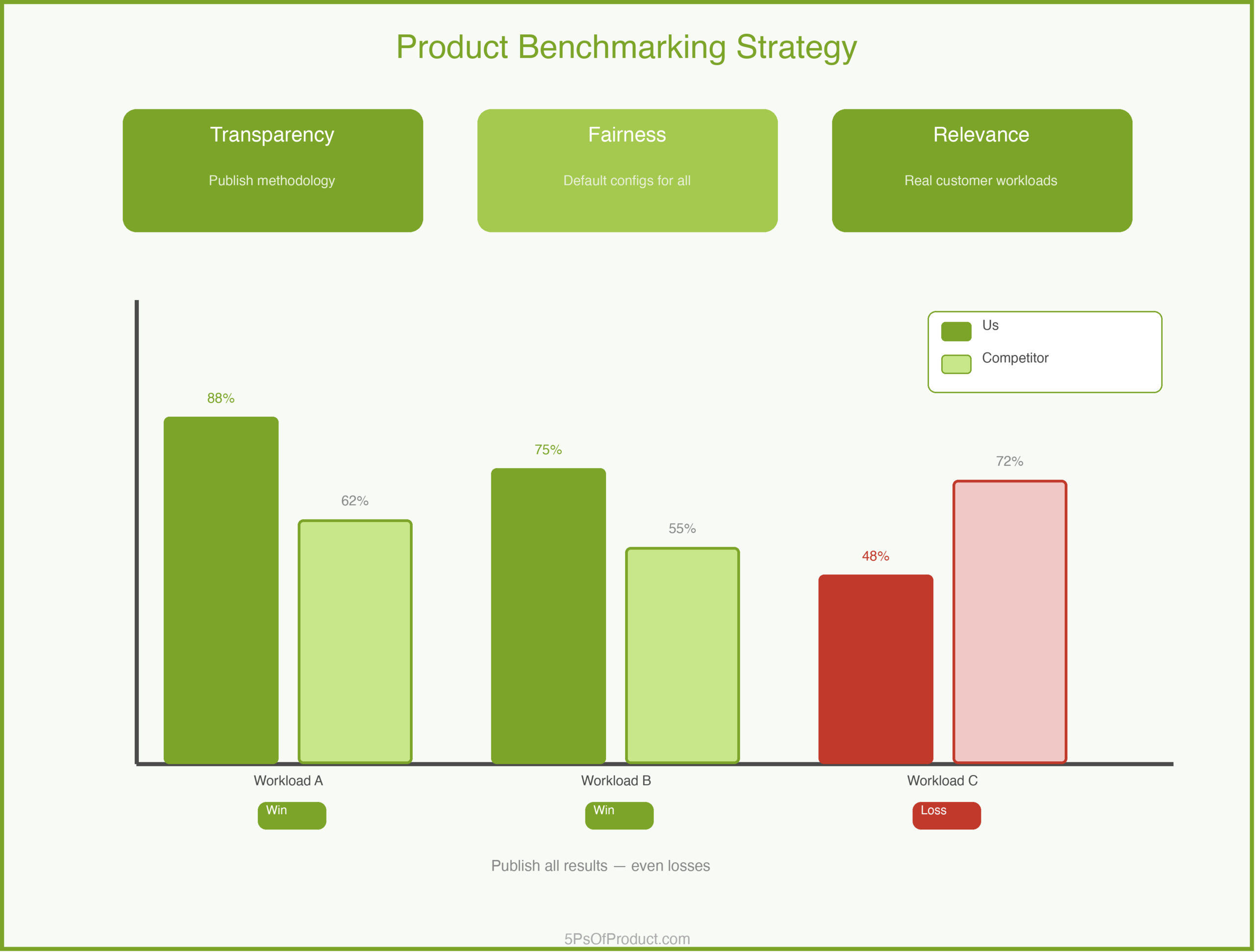
    1. Transparency

    Publish your methodology. All of it. What hardware did you use? What software versions? What configuration settings? What dataset? If someone cannot reproduce your results from the information you provide, your benchmark is an opinion, not evidence.

    The bar I set is simple: could a skeptical competitor reproduce these results? If the answer is no, you are not done.

    2. Fairness

    Use default configurations for every product, including your own. Test the same workload across all products. If you tune your product and leave competitors on defaults, someone will notice, and the resulting backlash will overshadow any performance advantage you actually have.

    3. Relevance

    Measure what customers actually care about. A benchmark showing you are 3x faster on a workload nobody runs is trivia. Talk to your sales team and your customers. What performance questions come up in evaluations? Those are your benchmark scenarios.

    A Concrete Example: QueryVault

    Imagine a company called “QueryVault” that builds a high-performance database. They compete in a crowded market where every vendor claims to be the fastest.

    QueryVault’s PM decides to build a benchmarking program:

    Define the workloads. Instead of inventing artificial tests, QueryVault talks to 15 customers about their actual usage patterns. Three workloads emerge as representative: high-volume writes, complex analytical queries, and mixed workloads.

    Establish the rules. They publish a methodology document alongside results. Every product runs with default configurations. Test infrastructure is identical. Test scripts go in a public repository.

    Run the tests honestly. QueryVault wins on two of three workloads. On mixed workloads, a competitor edges them out. The PM’s first instinct is to exclude that test. Instead, they publish all three results and add context explaining why mixed workloads are challenging for their architecture.

    That honesty becomes their strongest marketing asset. Customers trust a vendor who admits a weakness far more than one who claims to be the best at everything. As Teresa Torres describes in Continuous Discovery Habits, building trust with your audience requires showing your work, not just your wins.

    Designing the Benchmark Program

    A single benchmark report is a snapshot. A benchmarking program is a strategic asset.

    Cadence. Run benchmarks quarterly. This builds a track record and lets you show improvement over time.

    Versioning. Always test against the latest generally available version of each product. Old versions are easy targets but undermine credibility.

    Independence. If you can afford it, have a third party validate your benchmarks. But even without third-party validation, publishing your methodology goes a long way.

    Common Benchmarking Mistakes

    Cherry-picking scenarios. Testing only workloads where you win. The fix: test the workloads your customers actually run.

    Stale comparisons. Benchmarking against a competitor’s version from two years ago. The fix: always test the latest release.

    Ignoring setup complexity. Showing raw performance without accounting for configuration effort. As Martin Fowler points out in his writing on software metrics, a number without context is just noise.

    Vanity metrics. Reporting peak throughput when your customers care about p99 latency. This connects directly to product analytics: measure what your users experience, not what makes your slides look good.

    Why Benchmarking Matters for GTM

    Benchmarks are not just technical documentation. They are a go-to-market strategy tool. When a prospect is comparing your product to an alternative, a well-designed benchmark gives your sales team a credible, data-backed answer.

    Benchmarks serve different audiences: developers want raw numbers and reproducible tests; decision-makers want a summary and a story; analysts want independence and transparency.

    How to Use With AI

    1. The Methodology Reviewer

    Before you publish, use AI to find weaknesses in your methodology.

    Prompt: “You are a skeptical competitor who wants to discredit these benchmark results. List every methodological weakness you can find. Be specific about what is missing or could be challenged.”

    2. The Results Narrator

    Benchmark data needs to be translated into a story for non-technical audiences.

    Prompt: “Summarize these benchmark results for a VP of Engineering who has five minutes. Focus on what matters for their decision. Highlight both strengths and areas where we trail.”

    3. The Workload Designer

    Identifying the right benchmark scenarios requires understanding customer usage patterns.

    Prompt: “Based on these customer conversations, suggest 3-5 benchmark scenarios that would be most meaningful to our target buyers. For each, explain why it matters.”

    Guardrail: AI can help you frame and communicate benchmarks, but it cannot validate your numbers. Every data point in a published benchmark must come from an actual test run.

    Conclusion

    Product benchmarking is a discipline, not a marketing exercise. The teams that do it well gain a lasting credibility advantage. The teams that cut corners lose trust in ways that are hard to recover from.

    The hardest part is publishing results where you don’t win. But that honesty is exactly what makes benchmarks credible.

    What do you think? Comments are gladly welcome.
  • Product Launch Playbook

    Product Launch Playbook

    The best product launch I ever ran was completely uneventful on the day itself. No fire drills. No Slack channels blowing up. No frantic calls to engineering. Everything had already been done.

    That might sound anticlimactic, but it took me years and several painful launches to get there. Early in my career, I treated launch day like an event — something exciting that happened all at once. The result was predictable: last-minute scrambles, sales teams finding out about features from customers, support agents reading the blog post at the same time as everyone else.

    The lesson I learned is that a launch is not a day. It is a process. And if the process is right, the day is boring. That is the goal.

    What Is a Product Launch Playbook?

    A product launch playbook is a repeatable framework that coordinates everyone involved in bringing a product or feature to market. It covers what happens before, during, and after the public announcement.

    This is different from a go-to-market strategy. Your GTM strategy answers the strategic questions: who is this for, why should they care, how will they find it? The playbook is the execution plan that turns those strategic answers into coordinated action across teams.

    Think of it this way: the GTM strategy is the “what” and “why.” The playbook is the “who does what by when.”

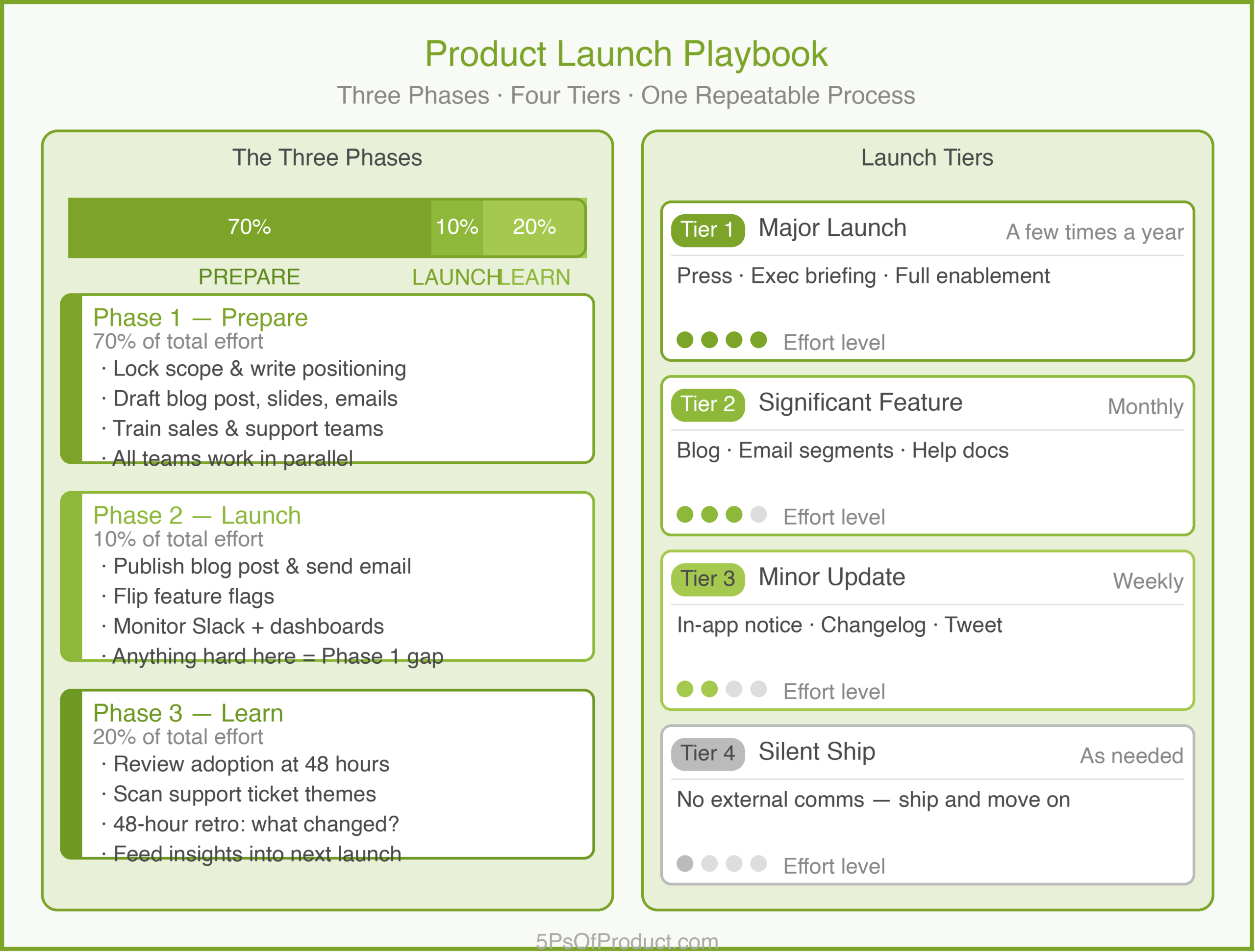
    The Three Phases

    Every launch — whether it is a minor feature update or a major product release — follows three phases. The Product Marketing Alliance describes this as the Ready-Set-Go framework, and the ratio of effort across these phases surprised me when I first mapped it out.

    Phase 1: Prepare (70% of the work)

    This is where most of the real work happens. By the time you reach launch day, 70% of the effort should already be done.

    Preparation means different things for different teams. For product, it means locking the scope and writing the positioning — building on the customer segments you have already identified. For marketing, it means drafting the blog post, creating screenshots, and scheduling emails. For sales, it means updating the pitch deck and scripting objection handlers. For support, it means writing help center articles and training the team.

    The key insight I picked up over the years is that all of these things need to happen in parallel, not sequentially. If you wait for marketing to finish the blog post before sales starts preparing, you have already lost a week.

    Phase 2: Launch (10% of the work)

    If Phase 1 went well, Phase 2 is just flipping switches. Publish the blog post. Send the email. Update the in-app messaging. Turn on the feature flag.

    The reason this should only be 10% of the total effort is simple: anything that requires real work on launch day is a sign that preparation was incomplete. I have seen teams spend launch day writing documentation. That is a Phase 1 failure, not a Phase 2 problem.

    Phase 3: Learn (20% of the work)

    This is the phase most teams skip entirely, and it is the one that matters most for the next launch. Within the first 48 hours, you should be looking at adoption numbers, support ticket themes, and sales feedback.

    I schedule a 48-hour retrospective for every launch. Not a big formal meeting — just a 30-minute check-in where we ask three questions: What went well? What caught us off guard? What would we change next time?

    Launch Tiers: Not Every Launch Needs the Full Show

    One of the biggest mistakes I see teams make is treating every launch the same. A small bug fix and a new product line should not get the same level of ceremony.

    I use a tiering system that looks like this:

    Tier 1 — Major Launch. A new product, a new market, or a fundamental change to the core experience. Full playbook: press outreach, executive briefing, sales enablement, support training, the works. These happen a few times a year at most.

    Tier 2 — Significant Feature. A notable addition that changes how customers work. Blog post, email to relevant segments, updated help docs, sales talking points. No press, no big event. These happen monthly.

    Tier 3 — Minor Update. A small improvement or iteration. In-app notification, changelog entry, maybe a tweet. No email blast, no sales training. These happen weekly.

    Tier 4 — Silent Ship. A bug fix, performance improvement, or backend change. No external communication. Ship it and move on.

    The tier determines how many of the playbook steps you actually execute. A Tier 3 launch doesn’t need a press kit. A Tier 1 launch doesn’t skip sales enablement. Matching the effort to the impact keeps your team from burning out on launches that don’t warrant it.

    A Concrete Example: NoteStream

    To make the discussion more concrete, let’s consider a specific example. Imagine a B2B SaaS company called “NoteStream” that sells a collaborative note-taking tool for product teams. They are about to launch their first AI-powered feature: automatic meeting summaries.

    NoteStream’s PM classifies this as a Tier 1 launch — it is a new capability that changes the product’s value proposition. The feature was scoped using a detailed PRD and validated through customer interviews.

    Here is how their playbook unfolds:

    Prepare (Weeks 1-4): The PM writes the positioning: “Stop taking notes. Start making decisions.” Marketing drafts a blog post and a 60-second demo video. Sales gets a one-page battlecard comparing NoteStream’s AI summaries to competitors. Support writes five new help center articles. Customer success identifies 20 power users for early access.

    Launch (Week 5): Monday: early access goes live for 20 users. Wednesday: blog post publishes. Thursday: email goes to all users, segmented by usage tier. The PM monitors the Slack channel for the first hour, then switches to watching the analytics dashboard.

    Learn (Weeks 5-6): By day three, NoteStream sees that adoption is strong among teams with 5+ members but weak among solo users. Support tickets reveal that solo users don’t have meetings to summarize — the feature doesn’t match their workflow. The PM notes that the next iteration should include “async summary” for written threads, not just live meetings.

    That post-launch insight is more valuable than any pre-launch planning could have produced. You only get it if you build the “Learn” phase into the playbook.

    The Internal Launch: The Step Everyone Skips

    Here is a pattern that has saved me more than once: launch internally before you launch externally.

    An internal launch means that every customer-facing team — sales, support, customer success, and even finance — sees the feature, understands the positioning, and has had a chance to ask questions before a single customer does.

    Research from Highspot found that 85% of go-to-market teams report frequent misalignment between sales, marketing, and R&D during launches. That number is staggering but it matches what I have seen. The fix is simple: give internal teams at least one week of lead time.

    In that week, I run a 30-minute demo for each team. Not a generic all-hands presentation — a tailored session where I explain what it means for their specific role. Sales needs to know how to sell it. Support needs to know the edge cases. Customer success needs to know which accounts to proactively reach out to.

    Why Most Launches Underperform

    Harvard Business School professor Clayton Christensen’s widely cited research suggests that roughly 95% of new products miss their commercial targets. A separate study in Marketing Letters found that the failure rate sits closer to 40% by the end of the second year, depending on how you define failure. Either way, the odds are not great.

    In my experience, the launches that underperform share a few common patterns:

    They confuse “shipped” with “launched.” The code is live, but nobody outside engineering knows it exists. Features that ship without communication might as well not exist.

    They skip the internal launch. Sales finds out from a customer. Support reads the blog post live. Everyone is reactive instead of proactive.

    They launch to everyone at once. No segmentation, no phased rollout. The message that resonates with power users lands in the inbox of someone who signed up yesterday and hasn’t finished onboarding.

    They never close the loop. There is no retrospective, no post-launch analysis. The same mistakes repeat on the next launch.

    How to Use With AI

    AI is not going to decide your launch tier or choose your positioning. Those are judgment calls that require context only you have. But AI is remarkably useful for the grunt work of launch preparation — the parts that take hours of effort but don’t require strategic insight.

    1. The “Launch Brief Generator”

    Instead of staring at a blank document, use AI to draft your launch brief from a feature spec.

    The Workflow:
    1. Paste your feature requirements or PRD.
    2. Prompt: “Based on this feature spec, draft a launch brief that covers: target audience, key benefit, positioning statement, launch tier recommendation (major, significant, minor, or silent), and three potential objections customers might raise.”
    3. Edit the output. The AI will get the structure right but the positioning generic. Your job is to sharpen it.

    2. The “Cross-Team Checklist Builder”

    Every team needs different things for a launch. AI can generate the first draft of a team-specific checklist in seconds.

    The Workflow:
    1. Describe the feature and its launch tier.
    2. Prompt: “Generate launch checklists for these teams: Sales, Support, Marketing, and Customer Success. For each team, list 5-7 specific action items they need to complete before launch day. Include estimated time for each item.”
    3. Send each team their checklist as a starting point.

    3. The “Announcement Multiplier”

    You need the same message in a dozen formats: blog post, email, in-app banner, social media, internal Slack announcement, sales one-pager. AI can transform one master message into all the variants.

    The Workflow:
    1. Write your core announcement — three sentences that capture the what, why, and for whom.
    2. Prompt: “Transform this core announcement into: (a) a 200-word blog post intro, (b) a 3-sentence email subject line and preview text, (c) an in-app notification under 50 words, and (d) a Slack message for the sales team that includes one competitive differentiator.”

    The Guardrail: AI is a preparation accelerator, not a strategy engine. It can draft your checklists, multiply your messaging, and simulate customer reactions — but it cannot tell you which segment to prioritize or whether this launch deserves Tier 1 treatment. Those decisions come from your understanding of the business, the market, and your customers.

    Conclusion

    A launch playbook is one of those tools that pays for itself the second time you use it. The first time, you are building the template. Every time after that, you are just filling it in.

    The core idea is simple: do the work before launch day so that launch day itself is boring. Prepare thoroughly, launch calmly, learn deliberately. Match your effort to the launch tier. And always — always — launch internally before you launch externally.

    Obviously this cannot be used as a cookie-cutter template for every team. Your tiers will differ. Your checklists will be longer or shorter. The important thing is to have a repeatable process instead of reinventing the wheel every time.

    What do you think? I would love to hear how your team handles launches. Comments are gladly welcome.

  • Go-to-Market Strategy

    Go-to-Market Strategy

    I once launched a feature I was incredibly proud of. We had spent months building it. The engineering was flawless. The design was beautiful. On launch day, we turned on the feature flag, sent out a generic email to our entire user base, and waited for the usage graph to spike.

    It flatlined.

    I spent the next week frantically emailing customers, trying to figure out why no one cared. The answer was painful: we had built a solution for a specific problem (power user data export) but marketed it to everyone as a general improvement. The power users missed the email because it looked generic. The general users ignored it because it sounded technical.

    We didn’t have a Go-to-Market (GTM) strategy. We just had a “release” plan.

    There is a big difference. A release plan is about when the code goes live. A GTM strategy is about how the product reaches the customer.

    The GTM Matrix

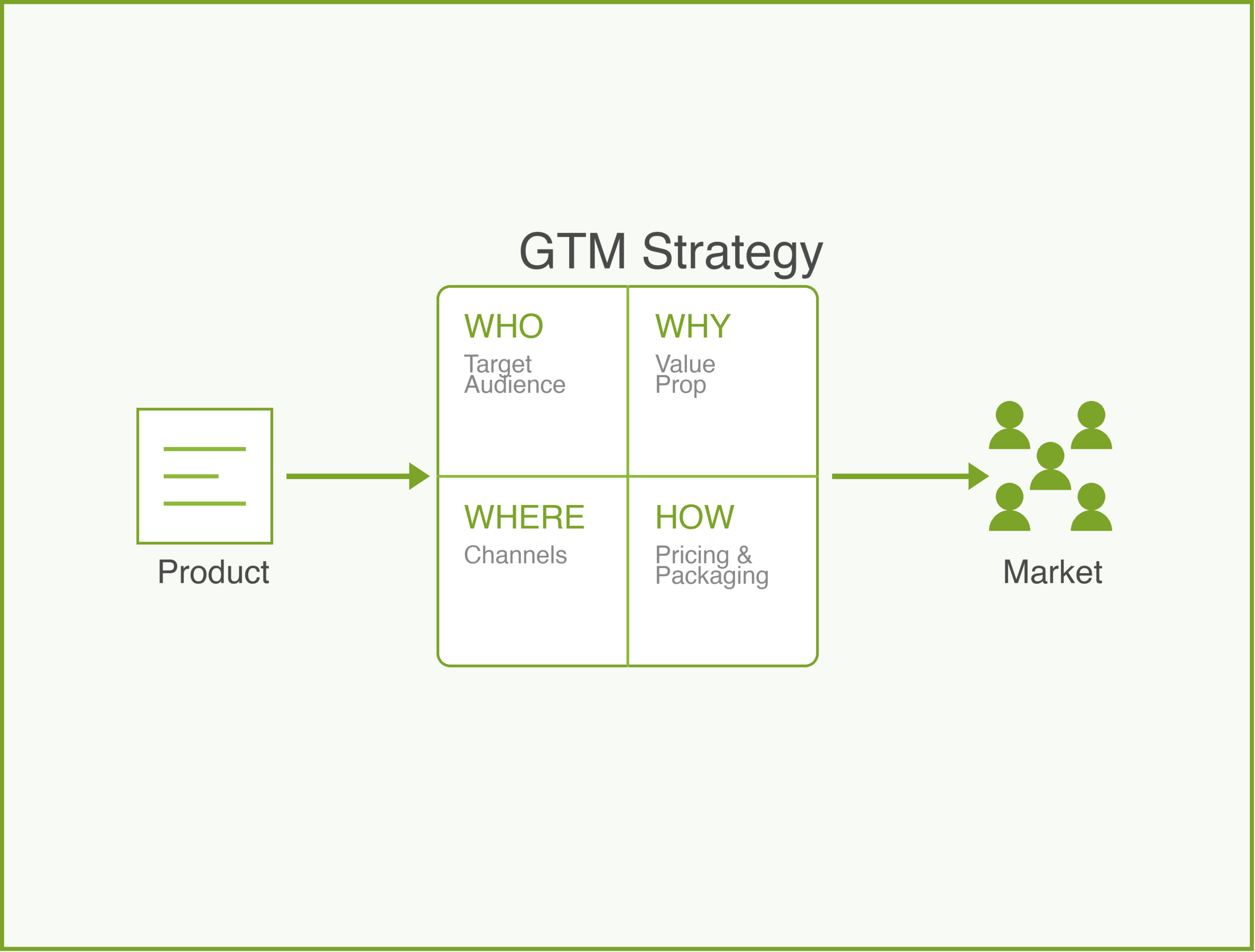
    A good GTM strategy answers four specific questions. I call this the GTM Matrix. If you skip one, the launch will likely fail.

    1. Who are we targeting? (Target Audience)

    “Everyone” is not a target market. As I learned the hard way, if you try to speak to everyone, you speak to no one.

    You need to define your Ideal Customer Profile (ICP). Are we targeting Enterprise CTOs? Freelance designers? Busy parents? The narrower your focus at launch, the easier it is to find them.

    2. Why should they care? (Positioning)

    This is where many PMs struggle. We tend to describe what the product does (“It uses ML to sort photos”) rather than why it matters (“Find your wedding photos in seconds”).

    April Dunford is the authority on this. She argues that positioning isn’t just messaging; it’s defining the context for your product. If I sell you a “cake,” you expect dessert. If I sell you “nutritional energy bars,” you expect a snack. If my cake is actually a high-protein energy block, calling it a “cake” sets the wrong expectations.

    3. Where will they find it? (Channels)

    How do your target customers buy things?
    * Inbound: Do they search Google for solutions? (Content marketing, SEO).
    * Outbound: Do they need a sales rep to explain the value? (Direct sales).
    * Viral: Do they invite friends? (Product-led growth).

    Don’t pick a channel just because it’s popular. Pick the one where your users already hang out.

    4. How much will it cost? (Pricing & Packaging)

    Is this a free feature for existing users? An upsell? A standalone product?
    Pricing isn’t just a number; it’s a signal of value. If you price a “Enterprise Security Suite” at $10/month, enterprises won’t trust it.

    Soft Launch vs. Hard Launch

    One of the biggest strategic decisions is how you roll it out.

    The Soft Launch (The “Beta”)

    A soft launch is when you release the product to a limited audience with little to no fanfare.
    * Goal: Learning and risk mitigation.
    * Best for: Risky new products, major workflow changes, or when you aren’t sure about the positioning.
    * Method: Invite-only access, releasing to 5% of users, or launching in a single geographic market (like New Zealand or Canada).

    The Hard Launch (The “Big Bang”)

    This is the press release, the Product Hunt post, the email blast to everyone.
    * Goal: Maximum attention and growth.
    * Best for: Proven features, highly anticipated updates, or when network effects are critical.
    * Risk: If it breaks, everyone sees it.

    I almost always prefer a soft launch followed by a hard launch. Use the soft launch to fix the bugs and refine the message. Then, when you know it works, make the noise.

    The Launch Checklist

    When you are ready to go, you need a tactical checklist. Here is the one I use to make sure I haven’t forgotten anything:

    • [ ] Internal Training: Does Support know how to answer questions? Does Sales know how to sell it?
    • [ ] Documentation: Are the help center articles written?
    • [ ] Metrics: Are the analytics tracking events firing? Do we have a dashboard ready?
    • [ ] Assets: Are the screenshots, videos, and blog posts approved?
    • [ ] Rollback Plan: If the server melts, can we turn it off instantly?

    How to Use With AI

    A Go-to-Market strategy often fails because of “blank page paralysis.” We know we need a plan, but starting from scratch is hard. This is where Generative AI shines—not as the strategist, but as the GTM Facilitator.

    1. The “Persona Stress Test”

    Instead of guessing how your messaging sounds, ask AI to roleplay your target customer.

    • Prompt: “Act as a busy Enterprise CTO who is skeptical of new tools. I am going to pitch you my new feature [Insert Description]. Tell me why you would ignore this email. Be harsh.”
    • Goal: Find the weak spots in your “Why” before you launch.

    2. The Channel Brainstorm

    We often stick to the channels we know (Email, LinkedIn). Use AI to find the ones you missed.

    • Prompt: “My target audience is [Insert Audience, e.g., freelance graphic designers]. Beyond the obvious social media platforms, where do these people hang out online? List specific communities, newsletters, or influencers.”

    3. The “Asset Generator”

    Writing 50 variations of a social media post is tedious.

    • Prompt: “Here is my core value proposition: [Insert Value Prop]. Generate 5 LinkedIn posts, 5 Tweets, and 1 short email announcement. Vary the tone: make one excitement-driven, one problem-focused, and one data-driven.”

    The Guardrail: AI can generate the content, but you must define the context. Never let AI decide your pricing or your core positioning. That requires human judgment about your market and business goals.

    Conclusion

    A Go-to-Market strategy is not something you write the week before launch. It should be part of the product development process from the very beginning.

    When you write the user story, ask “Who is this for?” (Audience). When you design the prototype, ask “How will they find this?” (Channel).

    If you build the GTM strategy with the product, you won’t be left staring at a flat line on launch day.

    What do you think? Comments are gladly welcome.